My home is a bit more complex than the average home, here’s a few tips to keep you enjoying your time.
Please remember that this is our home, take care with out house, and let us know if you break anything.
The Kitchen
Using the oven: push out the two round dials. The one on the left is the setting, once you find the setting you’re after, select the √ button on the right of the screen. Temperature is the other dial, and again use the √ button once you’re happy. There’s many settings, so if you’re really keen to use it properly, see: https://whirlpool.com.au/wp-content/uploads/2018/08/AKZM755IX-501930002225EN_IFU.pdf
Using the Stove: This is an induction stove top. It cooks and boils very quickly. To turn on, use the power button on the right side, if the padlock button is red, hold this for 5-8 seconds until it turns off. Slide your finger up the numbers (1-9 is cook, B is boil) to set the required temperature. It beeps a lot and turns off if there’s anything sitting on the numbers, so keep an eye out on this.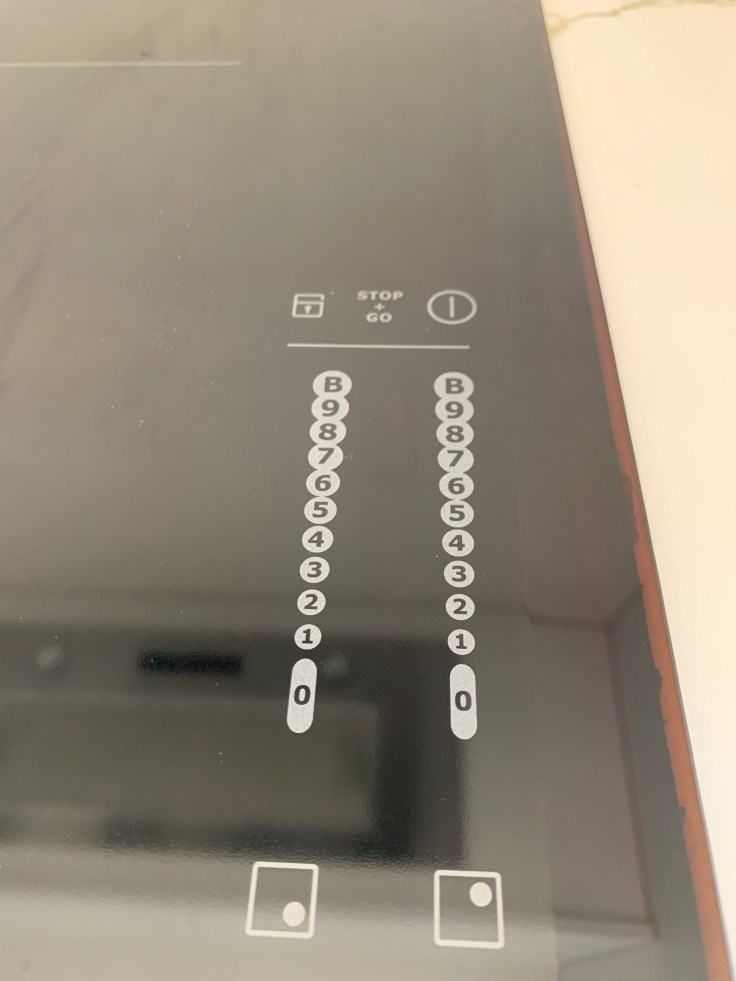
Heating
This is automatically set because of the slab heating. Do not touch the control for this. It takes hours to change the temperature this way, and if incorrectly used may cause a burst in the slab. The slab will heat the house up to 21.5 degrees throughout winter, and this automatically shuts off at 8pm, and the temperature will remain quite high throughout the night. If you are a hot sleeper, I would suggest opening a window for 15-20 mins before to cool the house down. Keep the windows closed otherwise, as they are extra thick and double glazed (laminated) to keep the warmth in and noise out.
If you need additional heat, the split system on ‘heat’ or ‘auto’ will provide this. The remote is on the wall in the hallway/foyer area.
Cooling
The split system on ‘cool’ or ‘auto’ function, or just the fan setting can be used to cool the house. If it’s warm inside and cool outside, the window in the kitchen is handy for lowering the temperature quickly, but there are no fly wires, so watch for bugs. Please re-lock window after use.
Laundry
Feel free to use the laundry facilities. Washing machine setting I like to use is the EcoBubble, which is one turn anti-clockwise.
If using drier, you must have the fan on, or the laundry door open. Also, don’t forget to clean out the lint filter and use the dryer balls, this speeds up the drying time and saves electricity.
TV
The smart TV is connected to the internet, please feel free to use this. Netflix is installed, along with other accounts, feel free to use the Guest user for these (please don’t watch anything inappropriate on our channels that might pop up for other guests). To stream directly onto the TV, Android devices can connect to the TV directly.
Sonos (music speakers)
There’s a single Sonos speaker connected in the main area, feel free to us.
If you haven’t used Sonos before, please explore here: https://www.sonos.com/en-au/home
Download the Sonos app, make sure you’re connected to the wifi and it should work. You can access various music apps, or play your own music.
If using with the large doors open, please be mindful of the neighbours, you’re 3 meters from their children’s bedrooms.
Coffee Machine
I’d suggest watching a few videos online before tackling this if youve never used one like this before.
 The Cottage Ballarat